Email Verifier: What It Is and Why Your List Needs One
An email verifier is software that tests an address before you send to it. It tells you whether the record looks well formed, whether the domain can accept mail, and, when the destination host is willing to answer, whether anyone is behind the local part. Teams use an email verification tool so campaigns, receipts, and product notices go to people who can actually open them, instead of to typos, abandoned inboxes, and throwaway signups.
This guide explains what an email verifier does, why lists collect bad records even when you never buy contacts, and how to judge a tool without treating marketing claims as proof. The focus is verification work, not prospecting for fresh addresses.
If you want the check types themselves (syntax, domain, and mailbox), read what email verification is. To test one address by hand, see this one-address walkthrough.
What an email verifier actually does
A verifier does not deliver a message. It inspects the address and reports a status you can act on. Hunter’s help article on the checks its Email Verifier runs is a clear public description of that sequence: first the format, then signs of a temporary or random-looking local part, then Mail Exchange (MX) records, then a session with the receiving host, then a mailbox probe that does not send mail. Hunter also looks for accept-all (catch-all) domains, whose servers answer as though every local part were real.
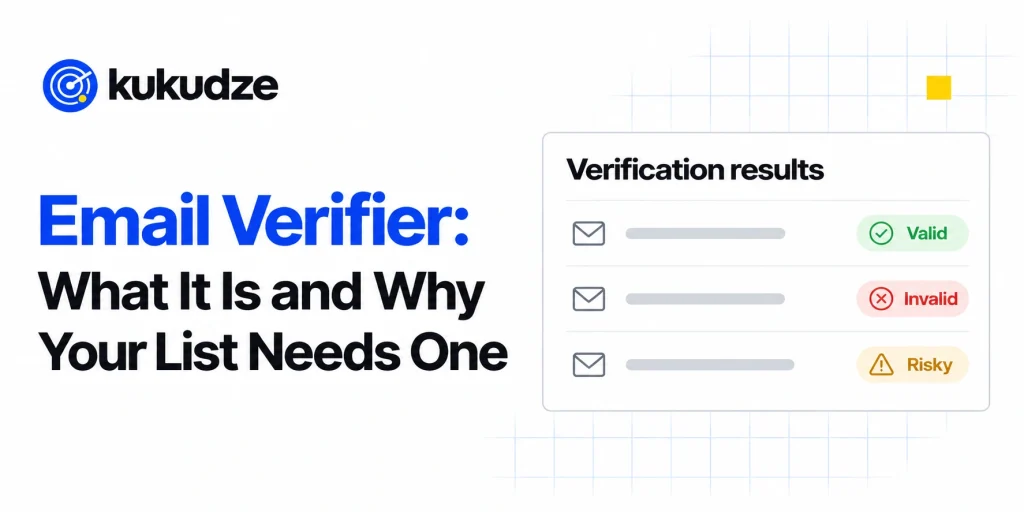
Different products name the statuses slightly differently, but most reports sort records into groups such as:
- Safe or valid: the mailbox accepted the check
- Invalid: the syntax failed, routing for the domain is missing, or the mailbox was refused
- Unknown or undeliverable-to-confirm: the server blocked, delayed, or refused to answer the probe
- Risky: extra flags such as disposable, role-based, or accept-all, which may still accept mail but create other problems
Those labels are a decision aid, not a promise that every “valid” address will stay reachable forever. People leave jobs, providers shut accounts, and mailboxes fill up after the check. A later glossary will walk through verification result statuses in more detail.
Why lists pick up bad addresses
You do not need a purchased file to end up with a dirty list. Everyday collection creates the same waste:
- A person types gmial.com or drops a character from their name
- A signup form accepts any string that contains an @
- Someone uses a temporary inbox so they can grab a coupon and disappear
- A contact changes employers and the old work address starts bouncing
- A shared inbox such as info@ or support@ sits on the list even though no one reads marketing there
- An old export still contains people who unsubscribed or bounced years ago
Google’s email sender guidelines instruct senders to confirm each recipient’s address before adding them to a list and not to purchase address files from other companies. Google also recommends unsubscribing people who bounce repeatedly. Those rules exist because mailbox providers treat a stream of failed deliveries as a sign that the sender is careless or unwanted.
An email validation tool will not fix a permission problem. If a person never gave permission to be emailed, cleaning the syntax will not make the message welcome. The verifier’s job is narrower: keep obviously undeliverable and high-risk records out of the next send.
What happens when you skip the check
Sending first and cleaning later is the expensive order of operations. The receiving network has already counted the failure against you.
Mailchimp’s article on cleaned contacts explains what that looks like inside one popular email platform. After a hard bounce, or after repeated soft bounces, Mailchimp marks the address as cleaned so future campaigns skip it. Mailchimp’s bounce overview adds a second point that matters for planning: failed deliveries are tidied after a campaign goes out, yet Mailchimp says it does not act as a list-cleaning service. Importing old or invalid contacts can still produce a wave of undeliverable messages, complaints, and account warnings.
Mailbox providers watch more than bounces. Google’s sender guidelines tell each sender to hold the complaint rate reported in Postmaster Tools beneath 0.30 percent, and they ask high-volume senders (anyone mailing over five thousand messages daily to consumer Gmail inboxes) to authenticate mail with SPF, DKIM, and DMARC and to offer one-click unsubscribe on marketing messages. A list full of dead addresses makes those other requirements harder to satisfy, because failed deliveries and low engagement travel together.
That is why teams run an email verifier ahead of a blast, a win-back send, or when they change ESP. The goal is to arrive with a file the provider has not already learned to distrust.
Problems these tools are designed to surface
A useful email verification tool looks past a single yes-or-no. The flags below show up in most serious products. Later articles cover several of them in depth; this section is only the map.
Syntax and obvious typos
The first filter asks whether the string can be an address at all: a local part, an @, and a domain. Many tools also suggest a correction when the domain resembles a frequent misspelling of a large provider. That step is cheap and it removes records that would bounce for a mechanical reason.
Domain and mail-server readiness
If the domain has no MX records, or the listed server cannot be reached, mail cannot be delivered there. Hunter’s check list treats missing MX data and a missing SMTP server as separate failures, which is a useful way to read a report: some records die at DNS, others die when the session with the receiving host never begins.
Mailbox existence
When the server allows it, the verifier asks whether that particular local part is welcome, still without sending a message. Some providers refuse this kind of probe or answer slowly. In those cases the result comes back unknown rather than valid or invalid, and a careful sender treats unknown as “do not blindly blast.”
Accept-all domains
A catch-all (accept-all) server says yes to every local part. Hunter warns that some accept-all results can still fail later, because a server’s welcome does not prove a person is behind the mailbox. See catch-all emails explained when you need a workflow for those records.
Disposable, role-based, and trap-like risk
Temporary inboxes, shared role addresses, and addresses that look like spam traps are not always invalid. They are often legal to store and sometimes useful (a billing contact at accounts@ may be exactly who should receive an invoice). They are poor fits for a promotional blast. kukudze does not flag disposable, role, or trap-like addresses, so handle them yourself: keep shared inboxes such as info@ out of promotional sends and use double opt-in at signup. kukudze does tell you when a domain accepts all mail. That note shows on a Valid row on every plan, Free included.
Two ways to use an email verification tool
Most products offer the same two doors, and you will usually want both.
A file upload is the right door when you already have a spreadsheet, a CRM export, or a backup of last year’s newsletter. You send the column of addresses through a bulk job, download the labeled file, and suppress the rows you do not want to mail. That workflow is covered in bulk email verification.
A live request is the right door when a new address is being typed into a form, a checkout, or an app signup. The page waits for a status and can reject a typo or a disposable inbox before it ever lands in your database. That path is an email verification API.
Neither door finds new contacts. If a neighboring team is building a prospect list, verification still belongs at the end of that process, after the addresses already exist.
How to judge an email verifier
Accuracy percentages on marketing pages are hard to compare, because vendors measure different things and test against different samples. Judge the tool by work you can inspect:
- Check depth. Does it stop at syntax, or does it also inspect MX data, talk to the mail server, and flag disposable, role, catch-all, and trap-like records?
- Result clarity. Can you export every status and act on it, including unknown? A tool that only says “good” or “bad” hides the records you should review by hand.
- Bulk and live coverage. You will need a file upload for the lists you already have and an API (or equivalent) for addresses that arrive later.
- Honest limits. Unknown results should stay unknown. A product that guesses “valid” when the server would not answer is selling confidence it did not earn.
- Plan fit. Monthly check limits, list size limits, and which checks each tier runs matter as much as the feature list. Compare those details on each vendor’s own pricing page, and look at kukudze pricing the same way.
A separate buying guide, best email verifier tools, walks through those criteria next to named products.
Where kukudze fits
kukudze is an email verifier for single addresses and lists. The pricing page lists four plans, all priced monthly.
Every plan runs the same four checks: the format, whether the domain can receive mail (MX), the mailbox answer (the mail server is asked if it accepts the address, and no email is sent), and whether the domain accepts all mail. Free costs $0 and gives 100 checks a month, with lists up to 50 rows. Starter is $9 a month for 2,000 checks and lists up to 1,000 rows. Pro is $19 a month for 5,000 checks and lists up to 5,000 rows. Agency is $39 a month for 15,000 checks and lists up to 15,000 rows. The paid plans are marked coming soon and cannot be bought yet, so Free is the plan open today. Plans differ only in checks per month and rows per list.
You sign up for a free account and confirm your email before your first check. Then you check one address, or paste a list or upload a CSV or TXT file. Each row comes back Valid, Invalid, Risky, or Unknown, and a Valid row on an accept-all domain gets a note. You download the results as a CSV. Lists and results are not stored on kukudze’s servers. kukudze has no public API today, so all checks run on the site. The free email verifier limits article spells out what the Free plan can and cannot catch.
FAQ
Is an email verifier the same as an email validation tool?
People use both names for the same category. In careful writing, “validation” sometimes means “does this string look like an address” and “verification” means “can this mailbox receive mail.” In product marketing the words are mixed. When you compare tools, read the check list rather than the label on the homepage.
Will a verifier stop every bounce?
No. A mailbox can vanish after the check, a server can accept a probe and later refuse the real message, and accept-all domains can hide empty local parts. Verification lowers the share of mail that never had a chance. It cannot guarantee inbox placement, which also depends on authentication, content, and whether people asked to hear from you.
Do I still need double opt-in if I verify addresses?
Yes, if you care about permission. A verifier confirms reachability, not consent. Google’s sender guidelines ask you to make signup intentional and to confirm the address before you subscribe someone. Those steps work alongside verification; they are not replaced by it.
Should I delete unknown results?
Not automatically. Unknown usually means the receiving server would not complete the probe. Deleting those rows can drop real customers at strict providers. A safer habit is to hold them out of the next promotional send, try again later, or reach the person through another channel.
Can I run a verifier on a list I did not collect myself?
You can run the technical checks. You should not mail the file if you do not have permission. Google tells senders not to buy address lists, and mailbox hosts treat unsolicited mail as a complaint risk regardless of how clean the syntax looks.
Wrapping up
An email verifier earns its keep by answering a practical question: which rows on this list can receive mail, and which ones are likely to hurt the next send? It will not write your campaign, find new contacts, or repair a reputation you have already damaged with a blast to a stale file. Used before you hit send, though, it keeps obvious waste out of the queue and gives your other deliverability work a cleaner starting point.
To run a file through a bulk job, follow bulk email verification. To check addresses as they arrive, see the email verification API. When you are ready to try kukudze on your own list, visit the email verifier product page and compare tiers on the pricing page.
Check your list before you send. Try the verifier with one address or a CSV list.
Start verifyingLatest articles
Free Email Verifier Limits: What You Can Check Without Paying
See what a free email verifier can check, what kukudze's Free plan gives you (100 checks a month, the same 4 checks as paid plans), and…
How to Read a Verification Report and What to Suppress
Learn how to read an email verification report, translate each label into an action, and suppress invalid emails before the next send.
Syntax Check vs Full Mailbox Verification
Compare an email syntax check with mailbox verification: what each layer catches, what it misses, and when a format-only pass is not enough to send.