Email Verification Results Explained: Valid, Invalid, Unknown, and Risky
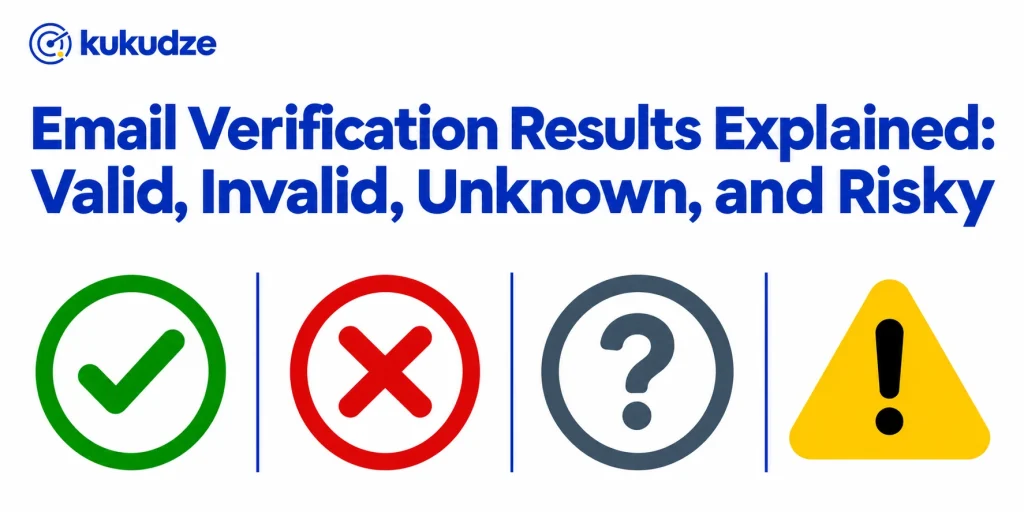
A verification file is only useful if you know what each label is asking you to do. Email verification results are not a single industry dialect. One vendor prints “valid.” Another prints “deliverable.” A third adds “do not mail” or folds several caution flags into “risky.” This glossary translates the common statuses so you can read a result file without guessing.
It complements what email verification is, which explains the checks behind the labels. Catch-all rows have their own deeper guide: catch-all emails. Temporary inboxes are covered in disposable email addresses. For turning a labeled file into a cleaned audience, see bulk email verification. The verification report guide shows how to act on each label. See the email verifier for the tool itself.
Why the same mailbox can get different labels
Vendors agree on the broad idea: some addresses clearly accept mail, some clearly do not, and some cannot be proven either way without sending a real message. They disagree on vocabulary and on how many extra flags they promote to a top-level status.
That is why a row can be “accept-all” in one export, “risky” in another, and “valid” with an accept-all sub-status in a third. The mailbox did not change. The legend did. Before you write a suppression rule, open the vendor’s own status documentation and map its words onto your actions: send, hold, retry, or remove.
kukudze uses four labels: Valid, Invalid, Risky and Unknown. A Valid row on a domain that accepts all mail gets a note. This article uses shared industry language and cites other vendors for how they write it, so you can map any export onto the same ideas.
Valid, or deliverable
A valid result (Hunter and NeverBounce use “valid”; Kickbox uses “deliverable”) means the tool concluded that the mailbox exists and was accepting mail when the check ran.
Hunter’s Email Verifier page describes valid as a positive outcome of its syntax, domain, and SMTP checks. NeverBounce’s result codes say a valid address has been verified as a real email that is currently accepting mail, and it marks that code as safe to send. Kickbox’s terminology page says a deliverable result means the recipient’s mail server stated the recipient exists, and that Kickbox also judged the address safe to send.
ZeroBounce’s status codes describe valid addresses as determined to be valid and safe to email, and the vendor states they will have a very low bounce rate of under 2 percent. That percentage is ZeroBounce’s published claim about its own valid bucket, not a universal guarantee for every tool.
A valid label is permission from the verifier, not a promise from the destination inbox. Filters, content, authentication, and the recipient’s own rules still decide whether a later message lands. People also close mailboxes after you check them. Treat valid as “safe to attempt,” then watch actual bounces. Hard bounce vs soft bounce explains how to sort the ones that come back.
Invalid, or undeliverable
An invalid result (Kickbox: “undeliverable”) means the tool concluded the address should not be mailed. Typical reasons include a syntax failure, a domain that does not route mail, or a mailbox the destination server rejected.
NeverBounce marks invalid as “don’t send” and says those addresses do not exist or are not accepting mail, so they will bounce. Kickbox says undeliverable means the address does not exist or is syntactically incorrect. ZeroBounce tells customers to delete invalid addresses from the list and lists sub-reasons such as mailbox not found, failed syntax check, possible typo, and no DNS entries.
This is the clearest “remove or suppress” bucket in most runbooks. If the tool also offers a typo suggestion, correct the value with the person when you can, then re-check the corrected string. Do not mail the original invalid value hoping the bounce was a fluke.
Unknown is not a verdict
Unknown email verification results cause more confusion than any other label, because the word sounds like a failure. It is usually an incomplete check.
NeverBounce says unknown means the server cannot be reached, that the code is not a negative result, and that re-verifying later typically returns a definitive answer. Kickbox says it returns unknown when it cannot get a response from the recipient’s mail server, often because the server is slow or temporarily unavailable, and that retrying after about five minutes can produce a valid or invalid response. Kickbox also states that unknown addresses do not count against your verification balance. Hunter states that unknown outcomes and disposable outcomes carry no credit charge.
ZeroBounce describes unknown as a case where it could not validate, typically because of an offline mail server or an anti-spam system. That page also states that in most cases 80 percent of unknowns are invalid or bad addresses, that you are not charged for them, and that you should submit a large batch of unknowns for re-validation. The 80 percent figure is ZeroBounce’s published statement about its unknown bucket. Other vendors do not publish the same ratio, so do not apply it to a Hunter, Kickbox, or NeverBounce file.
Operationally: retry unknowns, do not mass-delete them, and do not treat them as confirmed good either. If you must mail some of them, isolate the segment and watch bounces closely.
Risky as a group of caution flags
“Risky” is not a universal status name. Kickbox uses it as a top-level result that means the address has quality issues and may bounce or draw low engagement. On Kickbox’s terminology page, accept-all inboxes, throwaway inboxes, and role inboxes are classified as risky.
Other vendors often promote those same ideas to their own top-level codes instead of grouping them:
- Hunter returns accept-all and disposable as separate results alongside valid, invalid, and unknown.
- NeverBounce returns disposable and accept all (unverifiable) as their own codes.
- ZeroBounce adds catch-all plus separate labels it calls spamtrap and abuse, and a do_not_mail bucket, with sub-statuses under do_not_mail that include disposable, toxic, role-based, and related categories.
When a report says “risky,” open the reason or sub-status. A role address at a company you already work with is a different decision from a disposable inbox created two minutes ago. Collapsing every caution flag into one delete rule throws away that distinction.
Accept-all and catch-all labels
People ask “what does catch-all mean” because the label looks like a maybe. It is a domain setting, not a personal verdict. The destination server will take any local part, so the verifier cannot prove that this inbox exists without sending a real message and waiting to see what happens.
Hunter names this result accept-all. NeverBounce names it accept all (unverifiable) and notes that catch-alls bounce at about half the list’s invalid rate, which is NeverBounce’s published rule of thumb, not a figure measured on your file. Kickbox places accept-all inside risky and says sending to those domains may increase bounce rates or lower open rates. ZeroBounce distinguishes an accept_all sub-status it treats as valid (for domains on its own accept-all list, with a stated bounce rate under 2 percent) from a catch-all status it says is impossible to validate without sending a real email.
If you need more than this summary, use the dedicated catch-all emails article. The short operational version: do not treat catch-all as invalid, and do not treat it as proven valid. Segment it.
kukudze checks for accept-all domains on every plan, Free included. When a domain accepts all mail, the Valid row gets a note so you can park it. The plans on the pricing page differ only in checks per month and rows per list.
Temporary and role inboxes in the result file
Disposable addresses point at services that issue short-lived inboxes. NeverBounce marks disposable as “don’t send” and describes them as temporary accounts used to avoid a personal inbox during sign-up. Kickbox advises against mailing disposable addresses and groups them under risky. Hunter returns disposable as its own result and does not charge credits for it.
Role addresses (sales@, info@, admin@) belong to a job function instead of one named person. Kickbox notes that they may not bounce, yet they can draw low engagement because there may not be a single reader behind them. ZeroBounce places many role addresses under do_not_mail and asks customers to examine that file before sending.
These flags are caution signs. Whether you suppress them depends on your channel. A support product that must reach billing@ differs from a newsletter that performs better with named subscribers.
kukudze does not flag disposable, role or spam-trap addresses. Its 4 checks cover the format, whether the domain can receive mail, the mailbox answer, and accept-all domains. If you need the other flags, filter role prefixes such as info@ yourself, keep a list of temporary inbox domains, and use double opt-in at signup. Read the docs of any vendor you use, and do not infer flags it does not print.
kukudze’s Free plan is $0 with 100 checks a month and lists up to 50 rows. It runs the same 4 checks and prints the same labels as every paid plan.
How four vendors write the vocabulary
| Idea | Hunter | NeverBounce | Kickbox | ZeroBounce |
|---|---|---|---|---|
| Safe to attempt | Valid | Valid | Deliverable | Valid (plus some sub-statuses) |
| Do not mail; mailbox failed | Invalid | Invalid | Undeliverable | Invalid |
| Check could not finish | Unknown | Unknown | Unknown | Unknown |
| Domain accepts any local part | Accept-all | Accept all (unverifiable) | Risky (accept-all) | Catch-all, or valid with an accept_all sub-status |
| Temporary inbox | Disposable | Disposable | Risky (disposable) | Often under do_not_mail (disposable) |
| Shared function inbox | Not a top-level result on the verifier page | Not a top-level result code | Risky (role) | Often under do_not_mail (role_based) |
Use the table as a translation aid. When two tools “disagree,” check whether they counted catch-all inside valid, inside risky, or as its own pile.
How to act on each category
- Valid / deliverable: Eligible for normal sending, subject to permission and your content rules.
- Invalid / undeliverable: Suppress immediately. Correct typos when you have a better value, then re-check.
- Unknown: Retry. Hold back from large first sends until a later check resolves them, unless you have a documented reason to mail a small watched segment.
- Catch-all / accept-all: Park these rows in a separate segment. Send only when you have budgeted for additional bounces.
- Disposable: Default to suppress on newsletters and account notices. Allow only if you accept a short-lived relationship.
- Role: Decide by channel. Personal sales outreach and broadcast newsletters often skip them; operational mail may need them.
- Spam-trap, abuse, or do_not_mail (when a vendor uses those words): Obey that vendor’s no-send guidance. Do not second-guess a spam-trap label in order to keep a few extra rows.
Store the original status next to the contact. Months later you should not have to guess why a row left the sendable audience.
FAQ
What does “unknown” mean in email verification?
It means the verifier did not receive a definitive answer, often because the mail server was slow, offline, or shielded. NeverBounce and Kickbox both describe it as incomplete rather than invalid. Retry the row instead of deleting it on first sight.
Does catch-all mean the address failed?
No. Catch-all (or accept-all) means the server took the recipient without confirming that the specific mailbox exists. Some of those addresses work. Some bounce later. That is why they get their own label, and why they should not be swept into the invalid pile.
Should every risky row be deleted?
No. Kickbox’s risky group includes accept-all inboxes, throwaway inboxes, and role inboxes, which call for different policies. Delete or suppress the subtypes your written rules reject. Keep the rest in named segments.
Why don’t all tools use the word “valid”?
They describe a similar idea with different product language. Kickbox prefers deliverable and undeliverable. Others prefer valid and invalid. Extra caution flags may be standalone statuses or bundled as risky or do_not_mail. Always read the vendor page that defines the words in your export.
What labels will kukudze print on an export?
Each row gets one of four labels: Valid, Invalid, Risky or Unknown. A Valid row on an accept-all domain also gets a note. You can download the results as a CSV and map the labels onto this glossary.
Wrapping up
Email verification statuses are a legend for action: send, hold, retry, or remove. Valid (or deliverable) means the check succeeded. Invalid (or undeliverable) means the row should leave the sendable list. Unknown means you do not know yet. Risky, catch-all, disposable, and role labels deserve their own rules. Translate those ideas through each vendor’s documentation. On kukudze, the four labels map straight onto this glossary.
Check your list before you send. Try the verifier with one address or a CSV list.
Start verifyingLatest articles
Free Email Verifier Limits: What You Can Check Without Paying
See what a free email verifier can check, what kukudze's Free plan gives you (100 checks a month, the same 4 checks as paid plans), and…
How to Read a Verification Report and What to Suppress
Learn how to read an email verification report, translate each label into an action, and suppress invalid emails before the next send.
Syntax Check vs Full Mailbox Verification
Compare an email syntax check with mailbox verification: what each layer catches, what it misses, and when a format-only pass is not enough to send.